 MeloAuto-Trusted PLC & DCS Parts Supplier
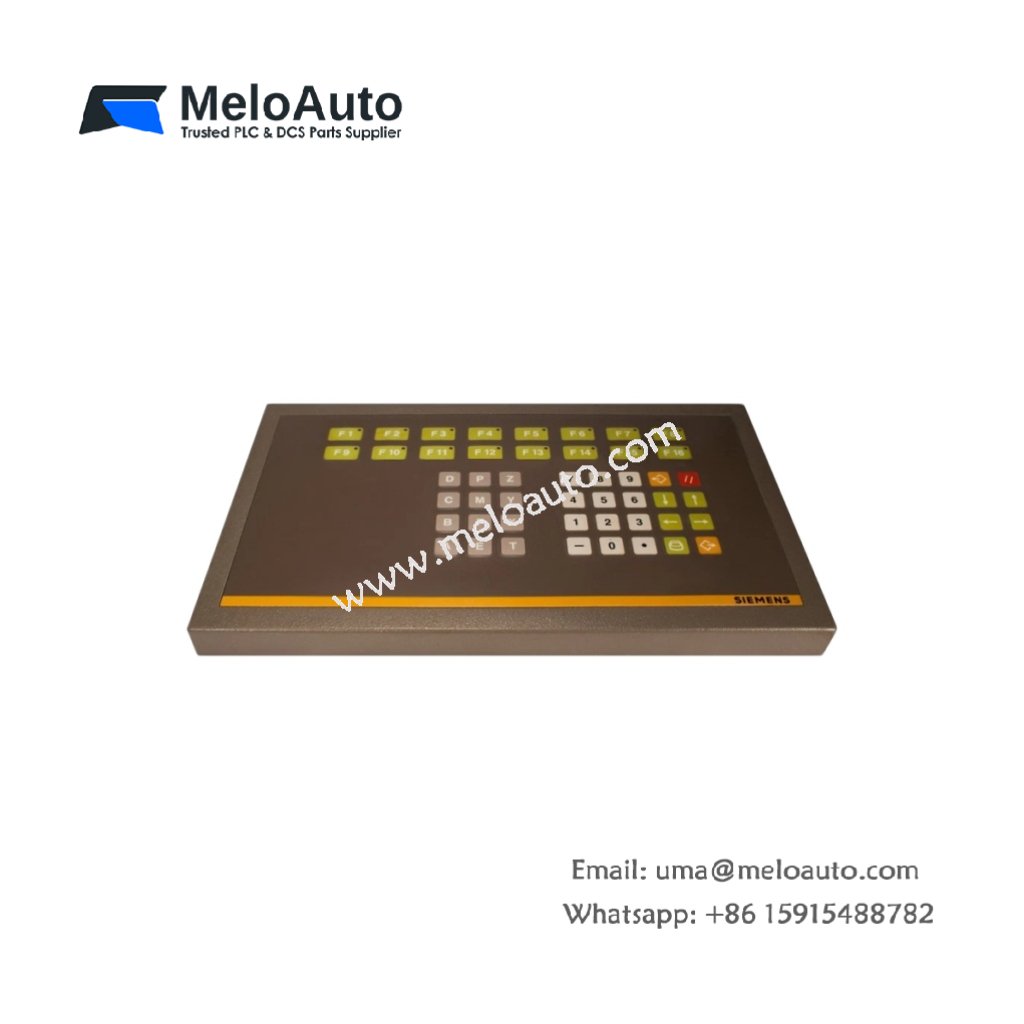
The Siemens 6FM1495-1AB10 provides a dedicated input device for WS 495 operator workstations. This membrane keyboard connects directly to SIMATIC HMI panels for data entry tasks. You can use it for machine control, recipe management, and parameter adjustments. It features tactile feedback keys arranged in a logical industrial layout. Consequently, this keyboard enhances operator efficiency in manufacturing environments.
Technical Specifications Overview
| Parameter | Detailed Specification |
|---|---|
| Model | Siemens 6FM1495-1AB10 |
| Category | SIMATIC WS 495 Operator Keyboard (Membrane Type) |
| Number of Keys | Approximately 40 keys (function + alphanumeric) |
| Key Type | Membrane with tactile dome actuation |
| Key Travel | 2.0 mm (typical) |
| Actuation Force | 150 g (centered) |
| Interface | Dedicated flat ribbon cable with 20-pin connector |
| Compatibility | WS 495, OP 25, OP 35 HMI panels |
| Operating Voltage | 5V DC (supplied by HMI panel) |
| Power Consumption | 50 mA (maximum) |
| Dimensions (approx.) | 380 mm x 140 mm x 12 mm |
| Weight | 0.48 kg (480 grams) |
| Cable Length | 1.5 meters (permanently attached) |
| Protection Rating | IP54 (front, splash-resistant) |
| Operating Temperature | 0°C to 50°C |
| Storage Temperature | -20°C to 70°C |
Functional Features and Operator Benefits
The Siemens 6FM1495-1AB10 uses sealed membrane construction for industrial durability. You can wipe the surface clean without damaging internal electronics. The key layout includes numeric pad, cursor arrows, and programmable function keys. Furthermore, the keyboard provides audible feedback through built-in beeper on key press.
This peripheral requires no external power source beyond the HMI connection. The flat ribbon cable carries both power and signal lines efficiently. Additionally, the membrane surface resists dust, oil, and mild chemical splashes. You can mount the keyboard on a desktop or through a panel cutout.
Installation and Connection Guidelines
First, power down your WS 495 or OP panel completely. Next, locate the dedicated keyboard port on the rear or bottom side. Then, insert the ribbon cable connector into this port carefully. Finally, secure the cable using the strain relief clips on the panel.
You must avoid bending the ribbon cable at sharp angles. The Siemens 6FM1495-1AB10 does not include any mounting brackets or screws. Consequently, you need a compatible mounting frame or adhesive pads. Always test all keys after installation for proper actuation feel.
This operator keyboard works perfectly with legacy WS 495 stations. It also supports OP 25 and OP 35 panels for machine interfaces. You can replace a worn keyboard without replacing the entire HMI unit. The 1.5-meter cable allows flexible positioning away from the main panel.














WeChat
Scan the QR Code with wechat