 MeloAuto-Trusted PLC & DCS Parts Supplier
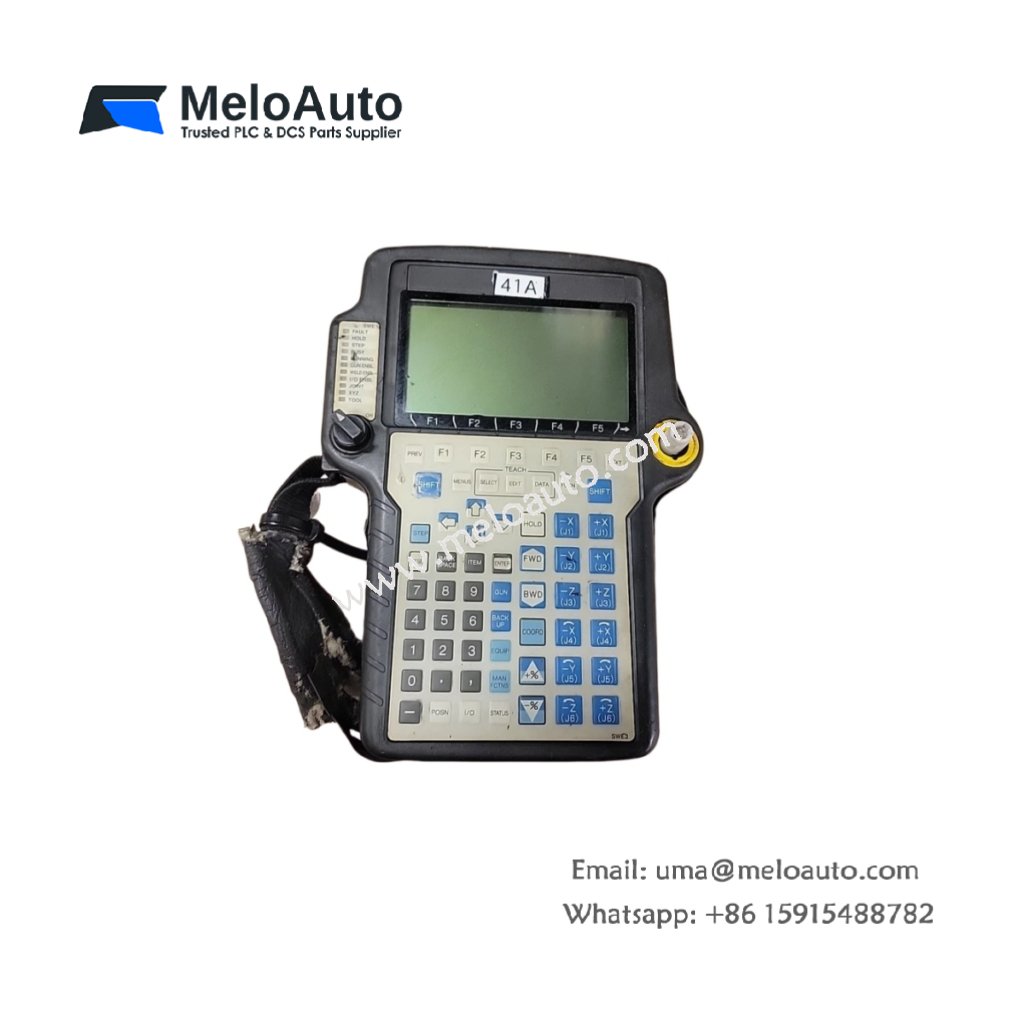
The GE A05B-2301-C370 provides handheld programming and control for robotic systems. This teach pendant connects directly to robot controllers for manual operation. Therefore, it enables programmers to guide robots through complex motion sequences.
Product Overview
We built this teach pendant for intuitive robot programming in industrial environments. Its ergonomic design fits comfortably in one hand for extended use. Moreover, this unit includes emergency stop and enabling switches for safety.
Technical Specifications
| Parameter | Specification |
|---|---|
| Dimensions | 24.0 cm (height) x 10.0 cm (width) x 4.5 cm (depth) |
| Weight | 0.85 kg (approximately 1.87 lb) |
| Interface Type | 8-pin circular connector with 5-meter coiled cable |
| Component Count | 164 components including LCD driver and joystick sensors |
| Energy Storage | 2 aluminum capacitors (100 µF, 16V) plus 6 ceramic |
| Display | 5.7 inch monochrome LCD, 320×240 pixels |
| Display Type | Backlit with adjustable contrast |
| Keys | 52 tactile membrane keys with LED backlighting |
| Joystick | 3-axis proportional with spring return |
| Safety Features | 3-position enabling switch, emergency stop button |
| Communication | RS-422 protocol at 115.2 kbps |
| Cable Length | 5.0 meters retractable coiled, 10 meters extended |
| Supply Voltage | 24V DC from robot controller, 0.5A max |
User Interface Design
The GE A05B-2301-C370 features 52 programmable keys with tactile feedback. Its six ceramic capacitors filter power for the display backlight driver. Additionally, two aluminum capacitors smooth the joystick analog power supply. You get responsive control with no lag in the motion feedback loop.
Energy Storage Components
Two aluminum capacitors provide local energy storage for the LCD display. They maintain stable backlight intensity during voltage fluctuations. Six ceramic capacitors decouple noise from the keypad scanning circuit. Clean power ensures accurate detection of each key press. The pendant also filters power for the enabling switch safety circuit.
Safety Architecture
The three-position enabling switch operates only at the middle detent position. This design prevents accidental robot movement during programming. The red emergency stop button connects directly to the robot controller’s safety chain. It breaks the drive power circuit independently of software control. Both safety devices meet ISO 13849 performance level PL d requirements.
Installation Steps
Connect the 8-pin circular connector to the robot controller’s pendant port. Turn the locking collar clockwise until it clicks securely. Then power up the robot controller with the pendant connected. The pendant will perform a self-test sequence on startup. Verify that the emergency stop button resets properly before any motion.
Programming Functions
Use the pendant to jog all robot axes in joint or world coordinate modes. Record positions by pressing the teach button at each desired waypoint. The pendant stores waypoints in the robot controller’s non-volatile memory. Edit programs using the full alphanumeric keypad with function keys. The LCD displays program lines, current position, and system status simultaneously.
Display Features
The 5.7-inch monochrome LCD shows 16 lines of text and simple graphics. Adjust the display contrast using dedicated up and down buttons. The backlight activates automatically when you pick up the pendant from its holster. A screen saver dims the display after 5 minutes of inactivity. The pendant includes a battery-backed real-time clock for timestamping events.
Application Scope
This teach pendant suits industrial robots in welding, painting, and assembly cells. Many automotive plants use the GE A05B-2301-C370 for spot welding robot programming. Its rugged housing withstands impact, oil, and coolant exposure.











WeChat
Scan the QR Code with wechat