 MeloAuto-Trusted PLC & DCS Parts Supplier
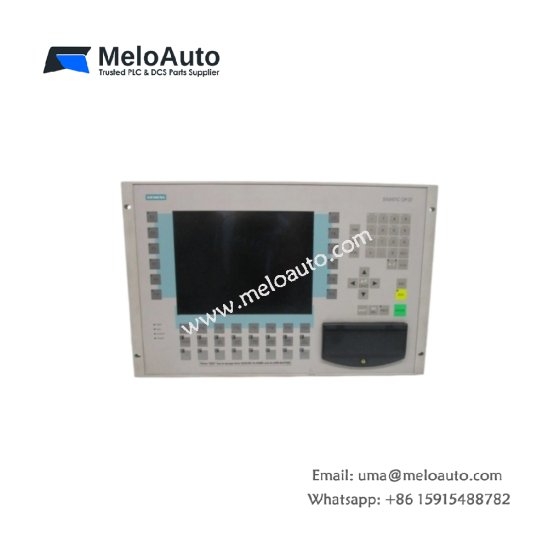
The Siemens 6AV3627-1QL01-0AX0 Operator Interface provides graphical operator control for SIMATIC systems. This color touch panel displays process data and accepts user commands. You will find it in machine control panels across many manufacturing industries. It connects directly to PLCs through the PROFIBUS DP network. Therefore, this unit replaces traditional pushbuttons and indicator lights.
The Siemens 6AV3627-1QL01-0AX0 Operator Interface measures 170 mm in height and 230 mm in width. Its depth reaches 45 mm for panel mounting. The unit weighs approximately 1.2 kilograms. It contains a 5.7-inch color TFT display with touch overlay. Four function keys provide additional pushbutton capability. Additionally, you get two serial ports for external device connection.
Key Technical Specifications
| Parameter | Value |
|---|---|
| Manufacturer | Siemens AG |
| Model | 6AV3627-1QL01-0AX0 |
| Product Type | Operator Interface |
| Display Size | 5.7 inches (diagonal) |
| Display Type | TFT color (256 colors) |
| Resolution | 320 x 240 pixels |
| Touch Technology | Resistive analog |
| Function Keys | 4 (configurable) |
| Communication Ports | 2 (RS-232, RS-485/PROFIBUS) |
| Memory | 1 MB user memory |
| Height | 170 mm |
| Width | 230 mm |
| Depth | 45 mm |
| Weight | 1.2 kg |
| Internal Components | 1 display, 1 CPU, 1 touch |
| Energy Storage | ≈ 400 µF (capacitive) |
| Power Consumption | 300 mA @ 24 VDC |
| Operating Temperature | 0°C to +50°C |
| Protection Rating | IP65 (front) |
| Mounting Method | Panel cutout |
Internal Architecture and Energy Storage
The Siemens 6AV3627-1QL01-0AX0 Operator Interface stores moderate energy in its power filter. Electrolytic capacitors hold approximately 400 microfarads total capacitance. A 32-bit processor runs the operator interface application at 100 MHz. This processor handles touch detection, screen updates, and PLC communication. The 5.7-inch TFT display presents 256 colors at 320×240 resolution. A resistive touch panel registers operator finger or stylus presses. Four configurable function keys provide quick access to critical functions. The unit includes 1 MB of flash memory for project storage. An LED backlight provides illumination for the display screen.
Connection Interfaces and Wiring Details
You will find a 9-pin D-sub connector for PROFIBUS DP communication. Connect this port to the PLC network for data exchange. The Siemens 6AV3627-1QL01-0AX0 Operator Interface also includes a 9-pin RS-232 port. Use this second port for connecting a printer or barcode scanner. A 4-pin terminal block accepts 24 VDC power input. Connect the positive wire to the +24V terminal and negative to 0V. Use 16 AWG copper wire for the power connection. A green PWR LED lights up when the unit receives 24 VDC. The touch panel registers input with a simple finger touch.
Configuration and Installation Steps
You cut a rectangular opening of 198 mm by 148 mm in the cabinet door. First, insert the unit through the opening from the front. Then, secure it using the four mounting clamps provided. Connect the 24 VDC power wires to the terminal block. The Siemens 6AV3627-1QL01-0AX0 Operator Interface consumes 300 mA from the supply. Connect the PROFIBUS cable to the 9-pin D-sub port. Use the ProTool or WinCC flexible software to create screens and tags. Define button positions, display fields, and navigation logic in your project. Download the configuration to the unit through the serial port. Test each screen and button before final machine operation.











WeChat
Scan the QR Code with wechat